Why each one exists, what goes wrong without it, and a working example you can run against this site's practice pages.
The big idea
A test suite is not always healthy. You're debugging one test, a feature isn't built yet, a bug is waiting for a fix, or one flow is simply slow.
Without annotations, you handle these by deleting tests, commenting them out or raising timeouts for everyone. Those fixes are easy to forget and hide problems. Annotations let you tell Playwright what's going on, in the test itself, so the report shows it too.
test.only, test.skip, test.fail, test.fixme and test.slow change how a test runs. test.step and test.describe aren't annotations, but they organise your tests and work closely with them, so they're covered here too.
Setup
Do this once. You'll then have a project that runs every example on this page.
1. Create the project
Run these in a terminal. When asked, choose TypeScript and accept the other defaults.
mkdir playwright-notes
cd playwright-notes
npm init playwright@latest
2. Point it at this site
Replace everything in playwright.config.ts with this. It runs in Chromium only, so your output will match the output shown here.
Create tests/annotations.spec.ts with this line at the top, then paste each example below it as you go. The test.only example is the one exception: it gets its own file, for a reason you'll see in a moment.
import { test, expect } from '@playwright/test';
test.only
Run just this test, and ignore every other test in the run.
Why you need it
One test out of 200 is failing and you're fixing it. You want to re-run only that test, over and over, until it passes.
Without it
You wait for the whole suite every time, or comment out the other tests and hope you restore them all afterwards.
Example
Put this in its own file, tests/only.spec.ts, with the import line at the top. There are three tests, and only the middle one should run.
Running 1 test using 1 worker

  ✓  1 tests/only.spec.ts:9:6 › short username shows an error (1.4s)

  1 passed (2.1s)
Watch out: if you commit a test.only, your pipeline runs that one test and stays green while the rest of the suite is ignored. Protect yourself by running npx playwright test --forbid-only in your pipeline. It fails straight away with item focused with '.only' is not allowed. You can also set forbidOnly: !!process.env.CI in your config.
For quick debugging you often don't need to edit the file at all. npx playwright test tests/only.spec.ts:9 runs the test on line 9, and npx playwright test -g "short username" runs tests whose title matches.
test.skip
Don't run this test, either always or only under a condition you choose.
Why you need it
Some tests shouldn't run everywhere. A test that deletes data is fine on a test environment, but must never run against production.
Without it
You keep separate copies of your test files, or comment tests out. Commented-out tests vanish from the report, so everyone forgets they exist.
Example
The first test is always skipped. The second is skipped only when TEST_ENV is production, and it gives the reason.
test.skip('sign up with Google', async ({ page }) => {
  // Not written yet. Nothing in this body runs.
  await page.goto('/practice/forms');
});

test('delete a task', async ({ page }) => {
  test.skip(process.env.TEST_ENV === 'production', 'Never delete real data in production');

  await page.goto('/practice/tables');
  const table = page.getByRole('table', { name: 'Tasks' });

  await table.getByRole('row', { name: /Fix login bug/ }).getByRole('button', { name: 'Delete' }).click();
  await expect(table.locator('tbody').getByRole('row')).toHaveCount(3);
});
Run it
npx playwright test tests/annotations.spec.ts -g "sign up with Google|delete a task"
What you'll see
A dash marks a skipped test.
Running 2 tests using 1 worker

  -  1 tests/annotations.spec.ts:3:6 › sign up with Google
  ✓  2 tests/annotations.spec.ts:8:5 › delete a task (524ms)

  1 skipped
  1 passed (984ms)
Now run it as production
On macOS or Linux:
TEST_ENV=production npx playwright test tests/annotations.spec.ts -g "sign up with Google|delete a task"
In Windows PowerShell:
$env:TEST_ENV="production"; npx playwright test tests/annotations.spec.ts -g "sign up with Google|delete a task"
Now both tests are skipped. In PowerShell the variable stays set, so run Remove-Item Env:TEST_ENV when you're done.
Running 2 tests using 1 worker

  -  1 tests/annotations.spec.ts:3:6 › sign up with Google
  -  2 tests/annotations.spec.ts:8:5 › delete a task

  2 skipped
Watch out: a skipped test protects nothing. Always give a reason, and review your skipped tests now and then, or they stay skipped forever.
test.fail
This test should fail because of a known bug. Run it anyway, and tell me when the bug is fixed.
Why you need it
You've found a bug and raised a ticket, but the fix is weeks away. You want the correct test written now, without turning the pipeline red every day.
Without it
The pipeline stays red until people stop trusting it. Or you skip the test, and nobody notices when the bug is fixed, or when it comes back.
Example
Imagine ticket BUG-101 says the Age field on the Inputs & Forms page should reject anything above 120. It accepts any number, so this correct test fails.
test('age above 120 is rejected', async ({ page }) => {
  test.fail(true, 'BUG-101: the Age field accepts any number');

  await page.goto('/practice/forms');
  const age = page.getByLabel('Age', { exact: true });
  await age.fill('500');

  expect(Number(await age.inputValue())).toBeLessThanOrEqual(120);
});
Run it
npx playwright test tests/annotations.spec.ts -g "age above 120"
What you'll see
This confuses most people the first time. You'll see a cross and 1 passed together. The cross means the test failed, and passed means that's what you told Playwright to expect, so the run stays green.
Running 1 test using 1 worker

  ✘  1 tests/annotations.spec.ts:18:5 › age above 120 is rejected (917ms)

  1 passed (1.3s)
When the bug is fixed
This is where test.fail earns its place. To simulate a fix, change 120 to 1000 in the assertion and run it again. The test now succeeds, so Playwright fails the run to tell you it's time to remove test.fail.
Running 1 test using 1 worker

  ✓  1 tests/annotations.spec.ts:18:5 › age above 120 is rejected (315ms)

  1) tests/annotations.spec.ts:18:5 › age above 120 is rejected ────────────

    Expected to fail, but passed.

  1 failed
    tests/annotations.spec.ts:18:5 › age above 120 is rejected ─────────────
Watch out:test.fail only checks that the test fails, not why. A typo in a locator would also make it "fail" as expected, so first run the test without test.fail and confirm it fails for the right reason.
test.fixme
This test is broken or blocked and needs attention. Don't run it for now.
Why you need it
A test can't pass yet, and running it wastes time, perhaps by waiting for a long timeout. You want it clearly marked as work still to do.
Without it
You use test.skip, and nobody can tell "this is intentionally not run here" from "this is broken and someone should fix it".
Example
The Appium checkbox on the Inputs & Forms page is disabled and marked "coming soon". This test describes the behaviour we want later.
test.fixme('Appium can be selected', async ({ page }) => {
  // Appium is still "coming soon", so check() would wait 30 seconds on a disabled box and fail.
  await page.goto('/practice/forms');
  const appium = page.getByRole('checkbox', { name: 'Appium' });

  await appium.check();
  await expect(appium).toBeChecked();
});
Run it
npx playwright test tests/annotations.spec.ts -g "Appium"
What you'll see
Running 1 test using 1 worker

  -  1 tests/annotations.spec.ts:28:6 › Appium can be selected

  1 skipped
Skip, fixme or fail? All three deal with tests you don't expect to pass. Use skip when the test doesn't apply here. Use fixme when it needs fixing and you don't want it to run. Use fail when there's a known bug and you want to hear as soon as it's fixed.
test.step
Give each part of a long test a name, so a failure tells you what the user was trying to do.
Why you need it
End-to-end tests are long. When one fails, you want to read "Welcome message appears" and understand the problem straight away, even if you didn't write the test.
Without it
You get a line number and a flat list of clicks and fills. You have to open the code and work out which part of the journey broke.
npx playwright test tests/annotations.spec.ts -g "sign up from errors"
What you'll see
It passes, and the steps stay out of the way.
Running 1 test using 1 worker

  ✓  1 tests/annotations.spec.ts:37:5 › sign up from errors to success (790ms)

  1 passed (1.2s)
Now make it fail
Steps pay off when something breaks. Change 'Welcome, ada!' to 'Hello, ada!' and run it again. The first line of the error now names the step:
1) tests/annotations.spec.ts:37:5 › sign up from errors to success › Welcome message appears ───

  Error: expect(locator).toHaveText(expected) failed

  Locator:  getByTestId('signup-result')
  Expected: "Hello, ada!"
  Received: "Welcome, ada!"
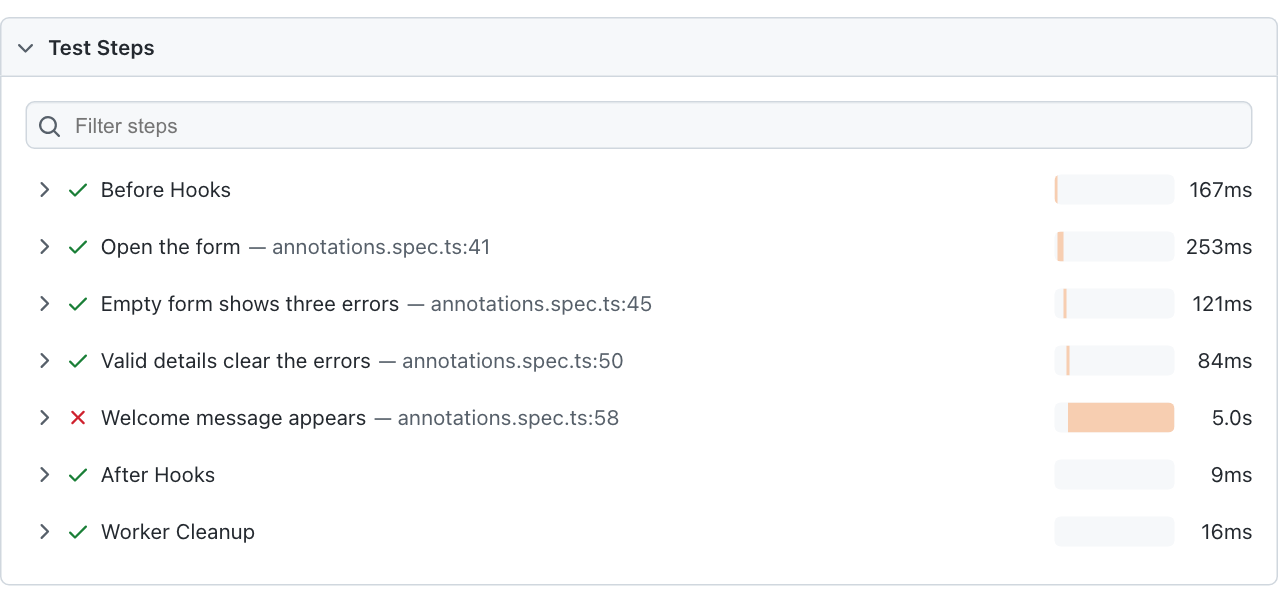
To see every step, run the test with the HTML reporter and open the report. Click the test, and you'll see which step broke and how long each one took.
npx playwright test tests/annotations.spec.ts -g "sign up from errors" --reporter=html
npx playwright show-report
The report from the failing run above: the first three steps passed, and "Welcome message appears" failed.
Watch out: always awaittest.step. Name steps for what the user achieves, like "Valid details clear the errors", rather than what the code does, like "Click button".
test.describe
Group related tests, so they share a name and their setup.
Why you need it
Several tests often start in the same place. A group lets them share one beforeEach, reads clearly in reports, and can be run on its own by name.
Without it
Each test repeats the same setup. A beforeEach at the top of the file would also run before unrelated tests in that file.
Example
test.describe('Confirm dialog', () => {
  // Runs before each test in this group, and no others.
  test.beforeEach(async ({ page }) => {
    await page.goto('/practice/alerts');
  });

  test('confirm can be accepted', async ({ page }) => {
    page.once('dialog', (dialog) => dialog.accept());
    await page.getByRole('button', { name: 'Delete item' }).click();
    await expect(page.getByTestId('confirm-result')).toHaveText('You clicked OK');
  });

  test('confirm can be cancelled', async ({ page }) => {
    page.once('dialog', (dialog) => dialog.dismiss());
    await page.getByRole('button', { name: 'Delete item' }).click();
    await expect(page.getByTestId('confirm-result')).toHaveText('You clicked Cancel');
  });
});
Run it
Because -g matches the full title, including the group's name, this runs the whole group.
npx playwright test tests/annotations.spec.ts -g "Confirm dialog"
What you'll see
Each test's title now starts with its group.
Running 2 tests using 1 worker

  ✓  1 tests/annotations.spec.ts:69:7 › Confirm dialog › confirm can be accepted (478ms)
  ✓  2 tests/annotations.spec.ts:75:7 › Confirm dialog › confirm can be cancelled (649ms)

  2 passed (1.5s)
Good to know: annotations work on whole groups too: test.describe.only, test.describe.skip and test.describe.fixme. Keep groups shallow, because deep nesting makes it hard to see what runs before a test.
test.slow
This test is slow but healthy, so give it three times the normal timeout.
Why you need it
A test that covers a long journey may need more than the default 30 seconds, even when nothing is wrong.
Without it
The test times out at random. If you raise the timeout for the whole suite instead, tests that really are stuck take longer to fail, and every failed run gets slower.
Example
This test visits every practice topic, and the log line shows its new time limit.
test('every practice topic opens', async ({ page }) => {
  test.slow();
  console.log(`This test may take ${test.info().timeout / 1000} seconds`);

  for (const topic of ['forms', 'buttons', 'alerts', 'frames-windows', 'tables']) {
    await page.goto(`/practice/${topic}`);
    await expect(page.getByRole('heading', { level: 1 })).toBeVisible();
  }
});
Run it
npx playwright test tests/annotations.spec.ts -g "every practice topic"
What you'll see
The limit is 90 seconds: three times the default 30. It's only a limit, so the test still finishes as soon as it can.
Running 1 test using 1 worker

This test may take 90 seconds
  ✓  1 tests/annotations.spec.ts:82:5 › every practice topic opens (1.5s)

  1 passed (1.9s)
Watch out:test.slow is not a fix for flaky tests. If a test is usually fast and only sometimes slow, find out why before giving it more time. If you need an exact limit instead of three times the default, use test.setTimeout(60_000).
Cheat sheet
Which one do you need?
Your situation
Use
Does the test run?
I'm debugging this one test
test.only
Yes, and no others
This test doesn't apply here
test.skip
No
There's a known bug, and I want to hear when it's fixed
test.fail
Yes, and it must fail
This test is broken and someone needs to fix it
test.fixme
No
This test is healthy but slow
test.slow
Yes, with 3× the timeout
This long test needs readable reports
test.step
Yes
These tests belong together
test.describe
Yes
Commands to remember
# Run one file
npx playwright test tests/annotations.spec.ts

# Run the test on a specific line
npx playwright test tests/annotations.spec.ts:9

# Run tests whose title matches
npx playwright test -g "Confirm dialog"

# Fail if anyone left a test.only behind
npx playwright test --forbid-only

# Create the HTML report, then open it
npx playwright test --reporter=html
npx playwright show-report

# Watch each step in the browser
npx playwright test --ui
Every example on this page is a real test that runs against this site. Ready to write your own? Try the practice pages. Found a problem? Let me know.